Got a Second-Hand MiniBrew? Here's How to Link It to Your AccountUpdated 2 months ago
Picked up a MiniBrew from someone else? Great choice! Before you can start brewing under your own account, you'll need to unregister the device from the previous owner's account first. Don't worry — it only takes a minute.
Why is this needed?
Each MiniBrew machine is linked to one account at a time. If the previous owner didn't unregister it before passing it on, the device is still tied to their account and won't connect to yours. Unregistering it frees the machine up so you can claim it as your own.
How to unregister the device
The best and easiest way is for the previous owner to unregister the device themselves from their account. Ask them to:
- Go to pro.minibrew.io and sign in to their account
- Find and select the device they want to unregister by tapping on "..."
- Tap Unregister
- Confirm the action
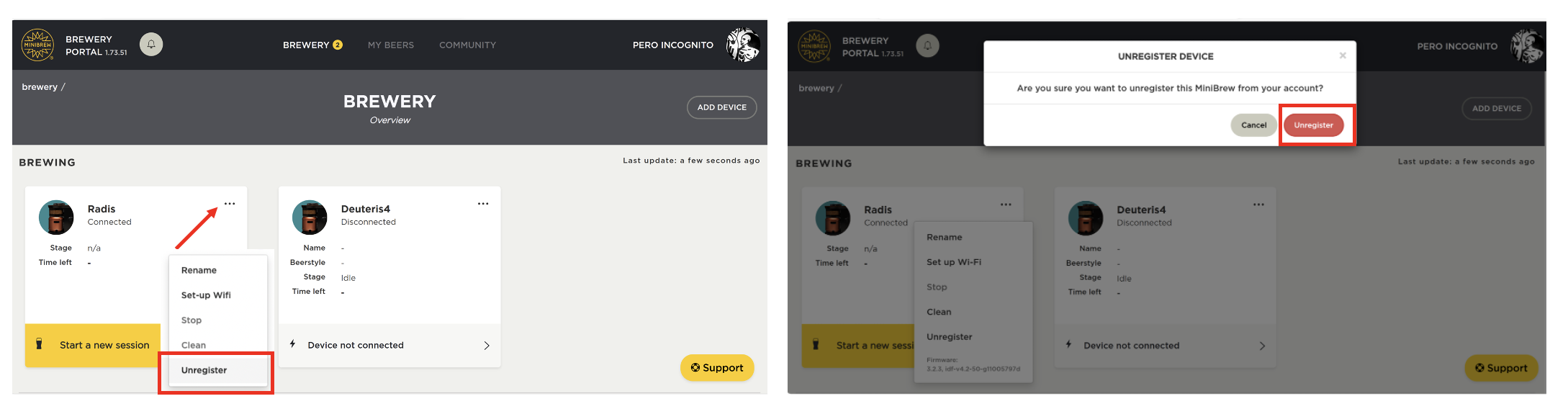
Once they've done that, the device is free to link to your own account.
Can't reach the previous owner?
No worries — our support team can remove the device from the old account on your behalf. To do this, we'll need a few details to verify ownership and protect everyone involved:
- Proof of purchase — a receipt, order confirmation, or invoice showing you bought the machine
- The serial number of the device (usually found on a sticker on the machine itself)
Once we have these, we'll unregister the device, and you'll be good to go. Reach out via our Contact page, and we'll take it from there.
Next step: add the device to your account
Once the device is unregistered, sign in to your own MiniBrew account at pro.minibrew.io and follow the steps to add your machine. Happy brewing! 🍺